Building Custom Agents in Salesforce: What Has Changed in Agentforce Builder

Creating a custom Agentforce agent now looks quite different from the experience Salesforce admins and architects first encountered. This is more than a redesigned interface: Salesforce has introduced a new authoring model combining natural-language configuration, structured logic, version control and integrated testing.

Since the week of 13 July 2026, new agents can only be created in the new Agentforce Builder within Agentforce Studio. Existing agents built in the legacy builder continue to operate and can still be edited, but the new builder is now the route for creating agents and receiving the latest capabilities.

Here are the main changes teams need to understand.

Agentforce Studio Is the New Starting Point

The new experience is centred on Agentforce Studio, which brings agent creation, testing and monitoring into one workspace. Its Explorer provides a consolidated view of an agent’s subagents, actions, variables, data sources and connections.

The builder has two ways to edit the same configuration:

Preview supports conversational testing, while the Console identifies errors and warnings. Built-in Agentforce assistance can also help create, refine and troubleshoot the agent.

This makes the builder suitable for both declarative and pro-code development without separating them into different agent configurations.

Topics Are Now Called Subagents

Salesforce began renaming agent topics as subagents in April 2026. Although the terminology change did not alter their basic functionality, the new name better describes their role in the new architecture.

A subagent owns a defined area of work. A service agent might contain separate subagents for identifying a customer, checking an order, processing a return and escalating a complaint. An Agent Router interprets the request and selects the appropriate route, after which the agent can move between subagents as the process develops.

Designers therefore need to think beyond a collection of isolated topics. Each subagent should have a clear purpose, appropriate actions and explicit transition conditions. Overlapping responsibilities make routing harder to predict and test.

Agent Script Adds Predictable Business Logic

One of the most important additions is Agent Script, the language behind the new Agentforce Builder. It combines natural-language reasoning instructions with programmatic expressions for business rules.

A language model remains useful when an agent must understand a request, interpret context or formulate a response. Important business decisions, however, should not depend entirely on how the model interprets a prompt on a particular occasion.

Agent Script can define conditional logic, retain values in variables, control transitions between subagents and specify the order in which actions run. It also lets teams identify where the model can reason flexibly and where it must follow a deterministic path.

For example, a model may recognise that a customer is requesting a refund. Structured logic can then require the agent to verify the order, check its status and compare the value with an approval threshold before running the refund action. Higher-value cases can be routed to an employee.

This hybrid approach provides conversational flexibility while keeping important business controls predictable.

Reasoning Now Follows a Structured Graph

The legacy reasoning engine generally classified a request into one topic and repeatedly reasoned about the next action. In the new builder, the agent operates through a graph of subagents connected by transitions.

Variables carry state along this path. Instead of repeatedly inferring the same information from the conversation, the agent can retain values such as whether the customer has been authenticated, which account is in context or whether approval is required.

This can make behaviour easier to understand and reduce unnecessary reasoning. It does not, however, remove the need for good process design. Teams must still define clear responsibilities, transitions and failure paths.

Draft, Commit and Activate Are Separate Steps

The new builder introduces a clearer release lifecycle. Work starts in an editable draft, where changes can be saved and tested without immediately altering the live agent.

When the draft is ready, Commit Version creates an immutable version that can be activated. Further changes require a new draft rather than editing the committed version.

The lifecycle is therefore straightforward:

  1. Create or update the draft.
  2. Test it in Preview or Simulation mode.
  3. Resolve errors and review the execution path.
  4. Commit a version.
  5. Activate the approved version.

This distinction reinforces an important point: saving an agent is not the same as deploying it to production.

Testing and Troubleshooting Are More Visible

Preview shows which subagents and actions the agent selected, while debugging information helps explain how it produced a response. Simulation mode can test behaviour without allowing the interaction to update organisational data.

This visibility matters because a plausible final answer does not prove that the correct path was followed. Testing should confirm that the agent selected the intended subagent, used the correct data, ran only authorised actions, retained variables correctly and followed required approval steps.

Teams should also test incomplete requests, alternative wording, unauthorised users and attempts to push the agent beyond its approved scope—not only ideal conversations.

Development and Deployment Have Changed Too

The new builder stores its human-readable Agent Script in an AiAuthoringBundle, including a .agent file that can be managed through Salesforce DX. This makes agent changes easier to compare, review in source control and include in a CI/CD process.

Local subagents and actions can also be associated with a particular agent version, reducing the risk that a change to a shared asset unexpectedly affects several agents. Organisations using automated deployments should review their metadata and package configuration rather than assuming the legacy process will remain unchanged.

How to Approach Existing Legacy Agents

Existing agents are not replaced automatically. Salesforce provides an Upgrade to New Builder action that creates a new version in Agentforce Studio and converts the original configuration to Agent Script. The legacy agent remains unchanged and available during validation.

A controlled migration should follow these steps:

  1. Record the existing agent’s expected behaviour and create baseline tests.
  2. Upgrade the agent without redesigning it at the same time.
  3. Run the same tests against the upgraded version.
  4. Resolve any differences before adding improvements.
  5. Introduce variables, transitions and deterministic controls gradually.
  6. Test again before activating the new version.

Separating migration from redesign makes problems easier to diagnose. If both happen together, it becomes difficult to determine whether a changed result came from the conversion or the new design.

A Better Builder Still Requires Good Architecture

The new Agentforce Builder provides more control, but it does not replace architecture and governance. Teams must still define the business outcome, authorised users, trusted data sources, permitted actions and situations requiring human judgement.

Deterministic logic is valuable for permissions, validation, transaction order and decisions with material consequences. Model reasoning is useful where genuine flexibility is required. The aim is not to turn every instruction into code, but to apply stronger control where inconsistency would create risk.

clearMDM Examples

The new builder could support a clearMDM Data Steward Agent using separate subagents to review potential duplicate records, recommend a resolution and escalate uncertain matches to a human data steward. Each subagent would have a defined role while remaining part of one coordinated data-quality process.

Testing a clearMDM agent could include checking that it uses governed match results, does not merge records without the required approval and routes low-confidence recommendations for human review.

Custom Agent Readiness Checklist

Before committing and activating a custom agent, confirm that:

Conclusion

The new Agentforce Builder changes custom-agent development from a mainly prompt-led configuration exercise into a more structured software lifecycle. Agentforce Studio, subagents, Agent Script, graph-based execution and committed versions give teams greater control over agent behaviour and production changes.

For new projects, this means designing a coordinated workflow rather than a loose collection of topics and instructions. For existing projects, migration should be treated as a tested release—not simply an upgrade button.

The new tooling makes reliable agents more achievable, but reliability still depends on clear processes, trusted data, governed actions and disciplined testing.
References

Trusted Data for Agentforce: Why Operational MDM Matters

Salesforce AI agents can answer questions, reason over customer information and complete business actions. The reliability of those outcomes, however, depends on the quality of the data available to the agent.

Giving Agentforce access to more data does not automatically make that data trustworthy. If records are duplicated, incomplete or out of date, an agent may work from the wrong account, miss an important relationship or update a record incorrectly.

This makes trusted data for Agentforce an architecture concern rather than a one-off cleansing exercise. Organisations need to identify the correct customer, apply business rules, and maintain that trusted view as new data arrives.

Operational Master Data Management (MDM) provides this capability. In Salesforce, clearMDM establishes and continuously governs Golden Records that support Customer 360, Agentforce and Data 360.

Why AI increases the importance of data quality

Data-quality issues are not new. Salesforce teams have always managed duplicate records, inconsistent formats and information arriving from multiple systems. Agentforce increases the potential impact of those issues.

A person looking at two similar Account records may recognise that they represent the same organisation and investigate before acting. An agent needs reliable context and clear controls to reach the correct outcome safely.

Poor customer data can lead to:

Generative AI should not be expected to decide which source is authoritative without an agreed governance model.

Connected data is not necessarily trusted data

Modern Salesforce architectures can make information from many sources available to Agentforce. This provides valuable context, but connection and governance answer different questions.

Connecting data asks: What information is available about this customer?

Master data management asks: Which information should the organisation trust and use operationally?

Data 360 can connect, harmonise and activate enterprise data for Agentforce. Operational MDM complements this by determining how identities are matched, which field values survive, how exceptions are reviewed and how the authoritative operational record is maintained.

Access to connected data should therefore not be mistaken for proof of its quality.

From source records to a trusted Golden Record

A Golden Record is the authoritative representation of a customer, created through defined data-management decisions. With clearMDM, the process follows five stages:

Together, these stages turn data quality from a periodic clean-up project into an operational capability.

How clearMDM supports Agentforce

clearMDM is a Salesforce-native Operational MDM solution developed by Audit9. It provides several capabilities relevant to Agentforce:

Persistent customer identity

Duplicate records remain linked to an authoritative Golden Record with a persistent MDM identity. Agents and business processes gain a stable reference even when data arrives through different channels or systems.

Configurable matching and survivorship

Rules can reflect the organisation's business context. Different customer types, brands, markets or source systems can receive different treatment. Agentforce can use the result of governed rules instead of trying to resolve identity during each interaction.

Consolidated operational context

Purchases, loyalty activity, cases and other relationships can be consolidated around the Golden Record. This gives an agent a more complete customer view while Salesforce permissions continue to control access.

Lineage and continuous governance

Data lineage records how Golden Records change, while rollback provides a recovery route where appropriate. New and updated records are continually evaluated, ensuring Agentforce is supported by maintained data rather than a point-in-time snapshot.

Agentforce as part of data stewardship

The relationship works in both directions: trusted data improves agent decisions, while Agentforce can help maintain trusted data.

The clearMDM Data Steward Agent is built natively on Agentforce and integrated with clearMDM stewardship processes. It provides AI-assisted match scoring and reasoning to help determine whether potential duplicate records should be accepted, rejected or investigated.

A typical process is:

  1. clearMDM identifies potential duplicates using configured matching rules.
  2. The Data Steward Agent reviews the available context and recommends an outcome.
  3. A human data steward reviews uncertain or sensitive cases.
  4. Approved decisions are applied through governed clearMDM processes.
  5. Suitable decisions can be automated at scale within defined stewardship rules.

The agent is not being asked to manage customer data without boundaries. It operates within an established MDM process where outcomes, controls and escalation routes are defined.

For example, a high-confidence match may be suitable for automated acceptance. A lower-confidence match, VIP customer or compliance-sensitive record may still require human review. Autonomy can increase as the organisation gains evidence that the rules and agent behaviour are reliable.

Key architecture considerations

Architects should consider the data foundation, agent and business processes as one solution:

Trusted data for Agentforce checklist

Before allowing Agentforce to rely on customer master data, ask:

If these questions cannot be answered, adding more information may increase the agent's context without increasing trust.

Trusted data is an ongoing capability

Agentforce provides a flexible way for people and systems to interact with Salesforce. That flexibility makes the quality and governance of the underlying data more—not less—important.

Operational MDM establishes trust by resolving identity, applying survivorship rules, governing exceptions and maintaining the authoritative customer record as data changes.

clearMDM provides this capability natively in Salesforce and extends it with a Data Steward Agent, allowing human expertise and Agentforce automation to work together. The result is a continuously governed customer data foundation for Agentforce, Customer 360 and Data 360.

Audit9 provides Salesforce AI services and Salesforce data services, including Agentforce implementation, data-quality strategy and clearMDM Operational MDM. Contact Audit9 to discuss trusted data foundations for Salesforce AI or arrange a clearMDM evaluation.

References

clearMDM: Data Steward Agent for Agentforce

Salesforce Architects: Get Started with Agentforce

Salesforce: Security, Privacy and Compliance for Agentforce

clearMDM: Salesforce-native Operational MDM

From Agentforce Prototype to Production: An Architect’s Readiness Checklist

Creating an Agentforce prototype can be quick. Creating an agent that can be trusted with real users, real customer data and real business processes requires a broader set of architecture decisions.

The difference is important. A prototype demonstrates that an agent can respond to a controlled prompt and complete a selected action. A production implementation must continue to perform when requests are ambiguous, data is incomplete, integrations are unavailable and users behave in unexpected ways.

Salesforce describes an Agent Development Lifecycle spanning ideation and design, development, testing and validation, deployment, and continuous monitoring and tuning. The following checklist translates that lifecycle into practical production-readiness questions for Salesforce architects and delivery teams.

1. Start with a bounded use case

A useful Agentforce use case has a clear user, goal and boundary.

Before implementation, document:

The initial scope should favour a small number of high-value journeys over a long list of loosely related topics. A narrow agent is easier to instruct, secure, test and support. Additional capabilities can be introduced when evidence shows that the existing scope is reliable.

2. Establish trusted grounding data

An agent cannot compensate reliably for an unclear data model or poor-quality source data. If customer records are duplicated, status values are inconsistent or important fields are incomplete, the agent may confidently act on the wrong context.

For every response or action, identify the authoritative source. Consider whether the agent requires:

Then assess the data against the intended task. Completeness, accuracy, timeliness and identity resolution all matter. So do access controls: grounding must not expose information that the invoking user is not entitled to see.

Data quality should be monitored after launch rather than treated as a one-off migration activity. Production conversations often reveal missing knowledge, inconsistent classifications and weak ownership that were not visible during a prototype.

This is where an operational master data management capability can become part of the Agentforce architecture. clearMDM is a Salesforce-native Operational MDM solution developed by Audit9. It continuously cleanses, matches and merges customer data to maintain a trusted Golden Record, giving Agentforce a governed and authoritative customer view rather than leaving each agent implementation to resolve identity and data quality independently.

3. Design topics, instructions and actions as a contract

Topics define the work an agent can perform. Instructions guide its reasoning within that scope. Actions allow it to retrieve information or change the state of a business process.

These elements should form a clear contract:

Avoid relying on a long instruction to correct an action with an unclear interface. Action names, descriptions, inputs and outputs should be explicit enough for the reasoning engine to select and use them consistently.

The clearMDM Data Steward Agent provides a practical example. Its Agentforce capabilities are integrated with governed clearMDM matching and stewardship processes, supporting AI-assisted match scoring and duplicate review as well as automated acceptance or rejection within defined rules.

4. Enforce Least-Privilege Access and Layered Controls

An Agentforce agent operates within the Salesforce security model, but secure production design remains a shared responsibility. The agent should have only the permissions required for its defined use cases.

Review:

Do not grant broad access simply to make a prototype work. Excess permissions increase the impact of an incorrect topic selection, a misunderstood request or a compromised integration.

Agentforce should be protected by more than one type of control. The agent’s instructions can explain what it should and should not do, but important rules should also be enforced by Salesforce. Validation rules, Flow decisions, Apex checks, API controls and approval processes provide predictable safeguards that do not rely on the agent interpreting an instruction correctly.

5. Make escalation a designed outcome

Human involvement is not necessarily an agent failure. In many processes it is the correct and safest outcome.

Define escalation conditions such as:

clearMDM can use its Data Steward Agent to provide reasoning and a second opinion on potential duplicate records while leaving the final decision with a human data steward. As confidence, rules and operational evidence mature, selected decisions can be automated.

Include a safe default for uncertainty. When the agent cannot establish that an action is permitted, it should stop or escalate rather than improvise.

6. Test behaviour, not only configuration

Traditional unit and integration tests remain necessary for Flow, Apex and APIs. They are not sufficient for an AI agent, because natural-language input and model reasoning introduce variation.

A representative Agentforce test set should include:

Evaluate more than the final wording. Check topic selection, action selection, action sequence, grounding, instruction adherence, record changes and escalation behaviour.

Salesforce currently supports agent testing through the Agentforce Testing Center, Agentforce DX and the Testing API. Tests run in sandboxes and can consume requests and credits; they may also modify data. Test data and cleanup therefore need to be designed intentionally.

7. Plan deployment and rollback

Agentforce configuration should follow the same controlled delivery principles as other Salesforce metadata, while recognising that the agent also depends on data, knowledge, integrations and model-driven behaviour.

A release plan should identify:

Consider a phased release to a limited audience or a small proportion of traffic. Start with lower-risk actions, observe real interactions and expand autonomy only when the evidence supports it.

8. Operate a continuous evaluation loop

Production launch is the beginning of agent evaluation, not the end.

Monitor technical, behavioural and business measures. Useful indicators may include:

Aggregate metrics reveal trends, while session-level traces help diagnose individual failures. Salesforce’s Agentforce Observability capabilities are designed around this combination, including session tracing, conversation clustering, quality measures, health monitoring and consumption analysis.

Establish ownership for reviewing this evidence. Changes to topics, instructions, actions and grounding should be versioned, tested and released through the same controlled process as the original implementation.

Also define incident thresholds. A sudden increase in action errors, unsafe outputs or escalations may require an alert, restricted functionality or immediate deactivation.

A practical production gate

An Agentforce implementation is ready for production when the delivery team can answer “yes” to the following:

The objective is not to remove all uncertainty. That is unrealistic for any non-trivial production system and particularly for one that includes probabilistic reasoning. The objective is to constrain uncertainty, detect it and ensure that failures are safe and recoverable.

Agentforce can provide a flexible interaction and orchestration layer across Salesforce data and business processes. Its production value, however, depends on the architecture around the agent: trusted data, well-designed actions, layered security, repeatable testing and disciplined operations.

References

Agentforce Grid

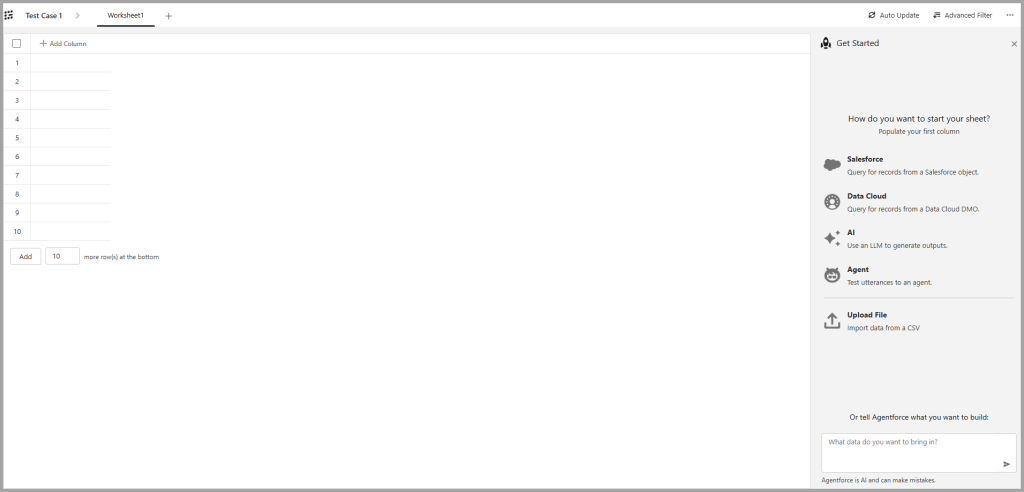
Agentforce Grid enables you to build structured workflows using AI agents. Each column builds upon the previous one, using either data from earlier steps or an AI-powered action to progress the workflow. Instead of working with isolated AI interactions, Grid enables you to build structured workflows where each step builds upon the output of the previous one.

Salesforce provides detailed product documentation, but in this post we'll explore what Agentforce Grid is, when to use it for testing, and how to configure your first grid.

Why use Agentforce Grid for testing?

Agentforce Grid provides an environment for experimenting with AI-powered workflows before incorporating them into production processes. Its spreadsheet-style interface makes it easy to test multiple scenarios, inspect the output of each step, and refine prompts without impacting existing automations.

For example, you can use Agentforce Grid to:

By enabling rapid experimentation and iteration, Agentforce Grid helps you build more reliable AI solutions while reducing the risk of introducing untested workflows into production.

Activate Agentforce Grid

Before creating your first Agentforce Grid, you'll need to enable the required permissions.

  1. Ensure Einstein is enabled in your Salesforce org.
  2. Create a new permission set.
  3. Add the Manage Agentforce Grids system permission to the permission set.
  4. Assign the permission set to the users who will create or manage Agentforce Grids.

For more detail on these prerequisites, refer to the official Salesforce documentation.

Create an Agentforce Grid

To create an Agentforce Grid:

  1. Open the App Launcher and search for Agentforce Grid.
  2. Select Create Grid.
  3. Enter a name and, optionally, a description for your grid.
  4. Select Create.

After the grid has been created, you'll see the main design canvas, where you can begin adding columns and configuring your workflow.

Building your Agentforce Grid

On the right-hand side of the designer, you'll find five options for creating the first column of your grid:

Choose the option that best matches the starting point for your workflow. Each subsequent column can build upon the output of the previous one, allowing you to combine data retrieval, AI reasoning, and business actions into a single workflow.

If you're unsure where to begin, Agentforce can also assist with creating your grid by generating a starting workflow based on your requirements. For more information, refer to the Salesforce documentation on building Agentforce Grids.

Understanding Credit Cost

When creating a grid worksheet, you can see the 'Credit Cost'. This refers to the Usage Based Pricing model where actions performed by Agentforce consume Flex Credits for the actions configured within the grid.

Agentforce uses Salesforce's usage-based pricing model, where AI-powered actions consume Flex Credits. Monitoring the Credit Cost helps you understand the potential usage of your workflow before it is executed. For more information about Flex Credits and usage-based pricing, see the Salesforce documentation.

Final Thoughts

Agentforce Grid offers a practical way to design, test, and refine AI-powered workflows in Salesforce. By combining Salesforce data, Data Cloud, AI capabilities, and Agentforce agents within a single visual interface, it becomes much easier to experiment with ideas before incorporating them into production solutions.

Agentforce Testing Centre (Beta)

The Agentforce Testing Centre (Beta) offers new testing features that replace the legacy testing approach.

In this post, we’ll explore the latest enhancements to Agentforce Testing Center (Beta), including custom evaluation criteria, inline editing, AI output visibility, and new ways to monitor agent quality over time.

Note: Salesforce provides the following statement 'Note Agentforce Testing Center in Agentforce Studio is a pilot or beta service that is subject to the Beta Services Terms at Agreements - Salesforce.com or a written Unified Pilot Agreement if executed by Customer, and the Non-GA Credit Consumption, Non-GA Gen AI, and the Non-GA Open AI LLM Provider terms in the Product Terms Directory. Use of this pilot or beta service is at the Customer's sole discretion.'

The new  features available are:

Let's look at each one in turn, which you can access through the App Launcher and search for Agentforce studio. If there is not an option to select the Agentforce Studio, you will need to log a support case.

Define Evaluation Criteria

For Salesforce help regarding this feature, the following link provides further information.

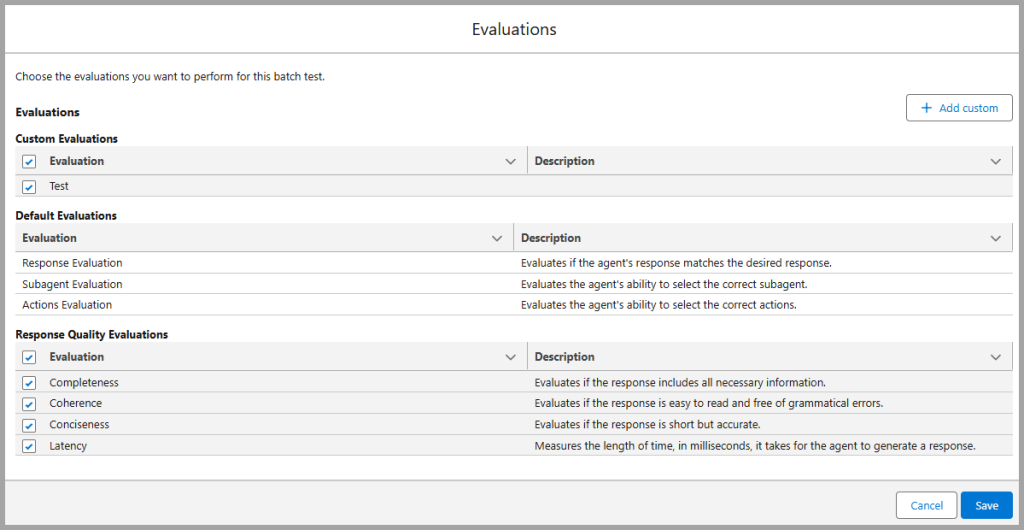
In summary, you can now define your own evaluations which enables you to ensure your AI outputs reflect your brand, meet quality standards and convey the correct point of view.

Default Evaluations include:

Response Quality Evaluation:

You can also setup your own custom Evaluation. Here's how it works:

  1. Create a new Test Suite.
  2. Enter the Basic Information, Test Conditions and Test Data.
  3. Within Evaluations, select the 'Add Custom' button.
  4. Select the LLM Judge. (An LLM judge (or LLM-as-judge) is when one large language model (LLM) evaluates the outputs of another.)
  5. Give the Evaluation a name and then click 'Next'.
  6. On the next step you can select an existing evaluation prompt, or create a new one.
  7. You can then set the threshold from 0 - 5. Any value greater than or equal to this threshold will be marked as PASS during testing.
  8. Select Save.
Agentforce Testing Centre - Evaluations

Inline Editing

For Salesforce help regarding this feature, the following link provides further information.

Previously, if you wanted to make any edits to the test suites, you would need to download the csv file, edit and then re-upload. Now, you can make changes in real time using inline editing.

The following provides an example of how you can do this:

  1. Navigate to Agentforce Studio (from App Launcher, search for Agentforce Studio).
  2. Select a Test Suite.
  3. Double click within a cell.
  4. Make any amendments you want to make.
  5. Click away from the cell. The changes will be saved.
Agentforce Testing Centre - Inline Editing

View AI Agent Inputs and Outputs

For Salesforce help regarding this feature, the following link provides further information.

One of the biggest challenges when testing AI agents is understanding how an output was generated. Agentforce Testing Center now provides visibility into both the agent inputs and outputs, making it easier to troubleshoot unexpected responses and validate behaviour.

The following provides an example of how to do this:

  1. Navigate to Agentforce Studio (from App Launcher, search for Agentforce Studio).
  2. Select a Test Suite.
  3. Within a Test Case, select the 'Agent Response' column.
  4. The Output Preview displays how the Agent comes up with the test result.

Assess the health of AI Agents

For Salesforce help regarding this feature, the following link provides further information.

You can compare the results of your tests over time, ensuring the AI agents are providing the same level of quality. This is a great way of ensuring the accuracy and quality of the tests being run. When a Test Suite is run, the Run History is provided by a link in a separate tab.

The following provides an example of how to do this:

  1. Navigate to Agentforce Studio.
  2. Select a Test Suite and then select to Run the test.
  3. Once complete, select the Run History tab.

Clicking on the link provides a summary of the Tests executed, the pass and fails and the reasons for the results. These can be used to compare with future test runs.

Agentforce Testing Centre -Run History

Clone Test Suite

Within the Test Suite, you can select the dropdown, top right, and then clone the Test Suite.

Further Resources

The following provides links to further Salesforce resources that discuss how to create Test Cases and Test Suites in the Agentforce Testing Centre (Beta).

Final Thoughts

The latest enhancements to Agentforce Testing Center (Beta) provide Salesforce teams with more control, visibility, and flexibility when testing AI agents.

Features such as custom evaluation criteria, inline editing, and historical run comparisons make it significantly easier to validate AI behaviour and maintain response quality over time.

As Agentforce continues to evolve, these testing capabilities will become increasingly important for organisations looking to deploy reliable and scalable AI experiences within Salesforce.

Privacy Overview

This website uses cookies so that we can provide you with the best user experience possible. Cookie information is stored in your browser and performs functions such as recognising you when you return to our website and helping our team to understand which sections of the website you find most interesting and useful.

